Templates
Template builds a layout tree from plain data — an array, a JSON string, or a JSON file — instead of PHP code. This is useful when a layout needs to be stored (in a database, a config file, a CMS field) or edited by someone who shouldn’t have to write PHP.
Loading a template
Section titled “Loading a template”use Kehet\ImagickLayoutEngine\Templates\Template;
Template::fromArray(['type' => 'rectangle', 'fill' => '#dc2626']);Template::fromJson('{"type": "rectangle", "fill": "#dc2626"}');Template::fromFile('/path/to/template.json');All three return a Template. Invalid input (malformed JSON, a missing file, or a node that doesn’t match the expected shape) throws Kehet\ImagickLayoutEngine\Templates\Exceptions\InvalidTemplateException.
Rendering
Section titled “Rendering”$drawable = $template->toDrawable($data); // DrawableInterface$drawable->draw($imagick, 0, 0, $width, $height);toDrawable(array $data = []) builds the tree into the same DrawableInterface objects (RowContainer, Text, Image, …) you’d get by constructing them by hand, so it draws exactly like any other item or container. $data supplies values for {{placeholder}} substitution (see below); it can be omitted for templates with no placeholders.
Settings
Section titled “Settings”Template::withSettings() returns a copy of the template configured with a TemplateSettings object, letting you opt into stricter parsing behavior without changing toDrawable()’s signature:
use Kehet\ImagickLayoutEngine\Templates\TemplateSettings;
$template = Template::fromJson($json)    ->withSettings(new TemplateSettings(imageBaseDir: '/var/app/uploads'));
$template->toDrawable($data)->draw($imagick, 0, 0, $width, $height);imageBaseDir: when set, everyimagenode’s resolvedfilepath (after{{placeholder}}substitution) must resolve inside this directory, ortoDrawable()throwsInvalidTemplateException. Symlinks and../absolute-path tricks are resolved and checked, not just pattern-matched. Defaults tonull(no containment — any local path is accepted, matching pre-TemplateSettingsbehavior).
TemplateSettings is a small, immutable options object — future settings are added as additional named constructor parameters, so existing calls to withSettings() keep working unchanged.
Node types
Section titled “Node types”Every node is an object with a type key that maps to one of the library’s container or item classes:
type |
Class |
|---|---|
row |
RowContainer |
column |
ColumnContainer |
grid |
GridContainer |
stack |
StackContainer |
text |
Text |
text-wrap |
TextWrap |
image |
Image |
rectangle |
Rectangle |
An unknown type throws InvalidTemplateException.
Common properties
Section titled “Common properties”These are read on every node, regardless of type:
margin,padding: a number applied to all four sides, or an object with any oftop/right/bottom/left.border: a{ "fill": ..., "stroke": ..., "strokeWidth": ... }spec applied to all four sides, or an object with per-side specs undertop/right/bottom/left. See Border.size: forced size in pixels along the main axis. Only read when the node is a child of aroworcolumn.column,row,columnSpan,rowSpan: placement. Only read when the node is a child of agrid.
Containers
Section titled “Containers”row/column:gap(int) andchildren(array of nodes), passed toRowContainer/ColumnContainer::addItem($child, size: $child['size'] ?? null).grid:templateColumns/templateRows(arrays ofint|null, see GridContainer),gap(a single number for both axes, or a[rowGap, columnGap]array), andchildren.stack: justchildren, added in order viaStackContainer::addItem($child).
Drawable items
Section titled “Drawable items”rectangle:fill,stroke,strokeWidth,font— passed straight to thedraw()helper.text/text-wrap:text(required), plusfill/stroke/strokeWidth/font,fontSize(default60),minFontSize(default10),gravity(defaulttop-left),letterSpacing,wordSpacing.text-wrapalso readslineSpacing.image:file(required),mode(none|fit|fill, defaultnone),gravity(defaultcenter).
Missing required fields (text on a text/text-wrap node, file on an image node) throw InvalidTemplateException, as does an invalid gravity or mode value.
Placeholder substitution
Section titled “Placeholder substitution”text and file values may contain {{name}} placeholders, filled in from the $data array passed to toDrawable():
Template::fromArray([ 'type' => 'text', 'text' => 'Hello, {{name}}!',])->toDrawable(['name' => 'World']); // renders "Hello, World!"A placeholder with no matching key in $data is left in the output literally ({{name}} stays as-is) rather than being replaced with an empty string or throwing.
file values are checked for ImageMagick coder/URI-scheme prefixes (https:, msl:, ephemeral:, caption:, etc.) and for a leading | (ImageMagick’s pipe-delegate syntax, which executes the rest of the string as a shell command) both before and after substitution — a literal "file": "https://..." / "file": "|some command", or a placeholder that resolves to one, is rejected with InvalidTemplateException. This prevents template data (which may come from an untrusted source, e.g. a form field) from being used to trigger server-side requests, arbitrary ImageMagick coders, or arbitrary command execution through the image path.
The same untrusted-data concern applies to path traversal: a template like "file": "uploads/{{userId}}.jpg" will happily read ../../../etc/passwd or an absolute path off disk if {{userId}} isn’t validated by the caller, since a substituted value is just as much a real file path as a literal one. If $data may come from an untrusted source, pass imageBaseDir via withSettings() so any file path that resolves outside the allowed directory is rejected instead of reaching Imagick’s file loader.
JSON Schema
Section titled “JSON Schema”The package ships template.schema.json at its root, describing every node type above. Point your editor at it for autocompletion and validation while authoring templates:
{ "$schema": "https://raw.githubusercontent.com/kehet/imagick-layout-engine/master/template.schema.json", "type": "rectangle", "fill": "#dc2626"}Example
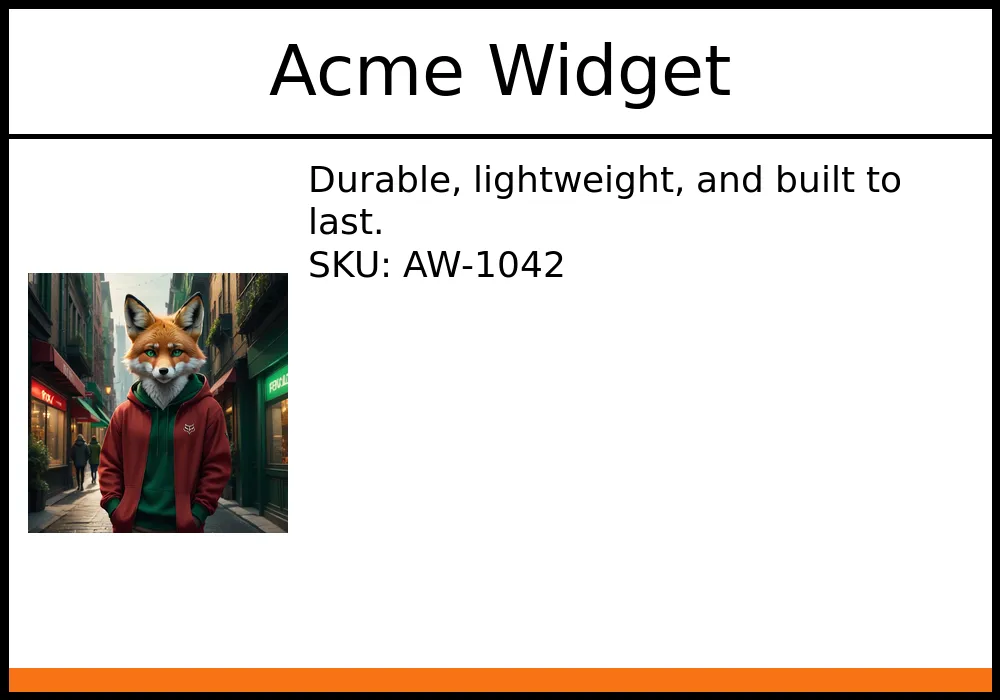
Section titled “Example”$json = <<<'JSON'{ "type": "column", "border": { "stroke": "#000000", "strokeWidth": 8 }, "children": [ { "type": "text", "text": "{{title}}", "fontSize": 70, "gravity": "center", "padding": 20, "border": { "bottom": { "stroke": "#000000", "strokeWidth": 4 } }, "size": 130 }, { "type": "row", "gap": 20, "padding": 20, "children": [ { "type": "image", "file": "{{logo}}", "mode": "fit", "size": 260 }, { "type": "text-wrap", "text": "{{description}}", "fontSize": 36 } ] }, { "type": "rectangle", "fill": "#f97316", "size": 24 } ]}JSON;
$data = [ 'title' => 'Acme Widget', 'logo' => __DIR__.'/logo.jpg', 'description' => "Durable, lightweight, and built to last.\nSKU: AW-1042",];
Template::fromJson($json)->toDrawable($data)->draw($imagick, 0, 0, $width, $height);